
Payouts API
Overview
The Payouts API enables you to make instant EFT payments to suppliers, employees, partners, or customers. It also allows you to check the status of your payouts and to retrieve your balance.
API endpoints
The following are the API endpoints for the live and sandbox servers:
| Service | Live | Sandbox |
|---|---|---|
| Authentication | https://dashboard.peachpayments.com | https://sandbox-dashboard.peachpayments.com |
| Payouts | https://payouts.peachpayments.com | https://sandbox-payouts.peachpayments.com |
API credentials
Follow these steps to find your credentials:
- Log in to the Peach Payments Dashboard.
- In the left navigation menu, click Payouts.
- Select the Settings tab and if you don't have API credentials available, click Create API credentials. The API credentials section enables you to view and then copy your client ID, client secret, and merchant ID.
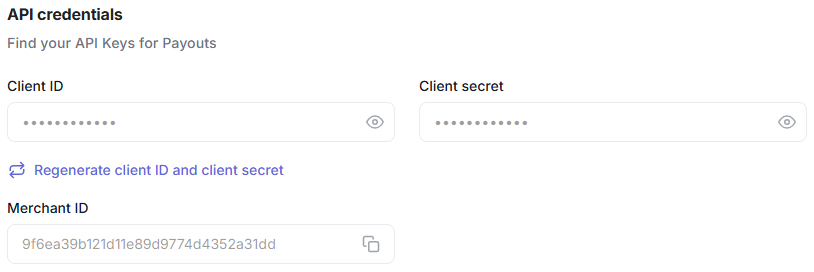
Payouts credentials.
- To retrieve your sandbox credentials, switch to the sandbox Dashboard and follow the instructions above.
- If someone compromises your credentials, use the Regenerate client ID and client secret option to create new API credentials.
IP allowlisting
IP allowlisting is an optional security control that restricts create payout requests to IP addresses that you provide. Other Payouts API endpoints, including status queries, reports, and bank account verification, remain unrestricted.
To enable IP allowlisting:
- Contact support and request IP allowlisting for Payouts.
- Provide the IPv4 addresses or CIDR ranges that can create payouts. Include the IPv4 addresses of any machines that create payouts on the Dashboard if you want to keep creating payouts from the Dashboard.
- Peach Payments adds the addresses to your allowlist.
After Peach Payments enables IP allowlisting:
- Send create payout requests from an allowlisted IPv4 address. If the source IP is not on the allowlist, the API rejects the request with HTTP 403 and result code
2900.005.002. - If you do not include the IPv4 addresses of the machines that create payouts on the Dashboard, you cannot create a payout or create bulk payouts from the Dashboard.
The allowlist supports IPv4 only. If you enable IP allowlisting and send create payout requests over IPv6, the API rejects them.
API flows
Authentication flow
To use the Payouts API, you must retrieve your API credentials and then use them to get an access token from the Authentication API.

Authentication flow.
The Authentication API endpoint is available in the API endpoints section.
-
Make a POST
{peach-auth-service}/api/oauth/tokenrequest to the Authentication API with your client ID, client secret, and merchant ID to generate an access token.curl --location --request POST '{peach-auth-service}/api/oauth/token' --header 'content-type: application/json' --data-raw '{ "clientId": "{{clientId}}", "clientSecret": "{{clientSecret}}", "merchantId": "{{merchantId}}" }' -
The Authentication API responds with an access token.
{ "access_token": "<access token>", "expires_in": "<token expiry duration in seconds>", "token_type": "Bearer" } -
Make calls to the API with the access token in the authorisation header, for example,
Authorization: Bearer {access_token}.- You can reuse the access token from step 2 for multiple API calls.
- When the token expires, you need to generate a new one.
See the Postman collection for more details on API authentication.
Create bank account verification request flow
The create bank account verification request flow enables you to check whether a bank account is valid and can receive funds. You can verify business bank accounts as well as personal ones. The idNumber field accepts either an individual's identity number or a company registration number, so you don't need a different request to verify a company's account. For the full request structure, see the create bank account verification request API reference.
Peach Payments recommends performing BANV in the following situations, at the very least:
- When a new bank account is added, to confirm the account details are correct.
- Whenever a recipient changes their banking details.
- Periodically, approximately every three months, to ensure account details remain current.
By verifying accounts before attempting to pay out to them, you can reduce invalid account, check digit verification, and other errors. This results in less time spent investigating failed payouts and lower costs.
See the overview for the list of banks that the bank account verification feature supports.
When executing a bank verification request, keep in mind the known limitations.
After making the bank account verification request, the system sends the result via a webhook. You can also use the Query bank verification result call to check the result.
%%{init: {'theme': 'base', 'themeVariables': { 'primaryColor': '#EE8031', 'loopTextColor': '#EE8031', 'textColor':'#EE8031', 'fontFamily': 'Inter' }}}%%
sequenceDiagram
autonumber
participant Merchant
participant Payouts API
Merchant->>Payouts API: Bank account verification request
Payouts API-->>Merchant: Response with verification ID
Payouts API->>Merchant: Webhook notification with verification ID and result
Merchant-->>Payouts API: Response (HTTP 200 (Result code, Result description))
alt Poll
    Merchant->>Payouts API: Query bank verification result request
    Payouts API-->>Merchant: Response with verification result
end
- The merchant sends a create bank account verification request to the Payouts API.
- The Payouts API responds with a verification ID.
- The Payouts API sends a webhook notification with the verification result.
- The merchant returns a 200 status code response acknowledging the webhook.
- If the merchant wants to, they can execute the query bank verification result call to get the result, if it is available.
- The Payouts API responds with the verification result.
To receive the webhook with the final result, you must have added a bank account verification webhook in the Dashboard.
Query bank verification result flow
If you haven't configured a webhook endpoint or don't want to wait for the webhook to arrive, you can also execute the query bank verification result call to check the verification result.
%%{init: {'theme': 'base', 'themeVariables': { 'primaryColor': '#EE8031', 'loopTextColor': '#EE8031', 'textColor':'#EE8031', 'fontFamily': 'Inter' }}}%%
sequenceDiagram
autonumber
participant Merchant
participant Payouts API
Merchant->>Payouts API: Query bank verification result request
Payouts API-->>Merchant: Response with verification result
- Execute the query bank verification result call to get the result of a create bank account verification request.
- The Payouts API responds with the verification result.
Create payout request flow
The create payout request flow enables you to create a payout to pay multiple customers.
Use one create payout request API call to pay multiple customers by including all the customer details in the payouts array as described in the API reference. Do not use a create payout request to pay a single customer unless you only have to pay one customer.
To see an example of a create payout request with multiple recipients, go to the API reference section and view the cURL request section on the right.
- When creating payouts, keep in mind the known limitations.
- Always set the
branchCodeto the universal branch code for the customer's bank, regardless of the customer's specific branch.- If you enable IP allowlisting, send create payout requests from an allowlisted IPv4 address.

Create payout request flow.
- The merchant sends a create payout request to the Payouts API.
- The Payouts API responds with a request ID and multiple payout IDs.
- The Payouts API pays a customer.
- The Payouts API sends a webhook notification for each payout.
- The merchant returns a 200 status code response acknowledging the webhook.
- If there are issues with the request or the customers bank accounts, payouts could fail.
- The Payouts API sends a webhook notification for each failed payout.
- The merchant returns a 200 status code response acknowledging the webhook.
List payout requests flow
The list payout requests flow enables you to view all your payouts and payout requests.

List payout requests flow.
- The merchant sends a list payout requests call to the Payouts API.
- The Payouts API responds with the payouts.
Query payout request flow
The query payout request flow enables you to query the status of the payouts.

Query payout request flow.
- The merchant sends a query payout request to the Payouts API.
- The Payouts API responds with the statuses of all the payouts in the request.
Retrieve your balance and last transaction date flow
The retrieve your balance and last transaction date flow enables you to retrieve your balance as well as the date of your last payout.

Retrieve your balance and last transaction date flow.
- The merchant sends a request to retrieve their balance and last transaction date to the Payouts API.
- The Payouts API responds with the merchant's balance and the date of their last transaction.
Download payouts transaction report flow
The download payouts transaction report flow enables you to download a CSV file containing all your payouts for the specified period.

Download payouts transaction report flow.
- The merchant sends a download payouts transaction report call to the Payouts API.
- The Payouts API responds with the payouts transaction report CSV.
Download payouts statement report flow
The download payouts statement report flow enables you to download a CSV file containing your statement for the specified period.

Download payouts statement report flow.
- The merchant sends a download payouts statement report call to the Payouts API.
- The Payouts API responds with the payouts statement report CSV.
Webhook flow
For payouts, webhooks provide updates on any changes in the state of the payouts. The Payouts API sends them regardless of whether the payout succeeded or failed.
For bank account verification, Peach Payments sends a webhook with the bank account verification result.
For float top-ups, Peach Payments sends a webhook with your topup amount and available balance.

Webhook flow.
- The Payouts API sends a payout status webhook, a bank account verification webhook, or a float top-up webhook.
To verify Payouts webhooks, you require the signing secret which you can request from Peach Payments support. You can verify the webhook's signature in two ways, using the
webhook-idandwebhook-timestampparameters that you receive in the webhook header: - The merchant returns a 200 status code response acknowledging the webhook.
Webhook configuration
Follow these instructions to add a webhook for Payouts, bank account verification, or float top-up using the Peach Payments Dashboard.
If you use IP allowlisting for webhooks, ensure that your allowlist includes the Peach Payments IPs to ensure that Peach Payments can send you webhooks.
Webhook events
When your service receives a webhook notification, it must return a 200 HTTP status code. Peach Payments sends notifications using the URL-encoded query string format via HTTP POST. If your service does not return a 200 HTTP status code, the webhook service considers the notification delivery as failed and retries sending the notification later.
Payouts
Peach Payments sends webhooks for the following payout events:
- Processing
- Successful
- Failed
See the API reference for more details on the payout status update webhook.
The webhook payload resembles the following:
{
  "status": "processing",
  "payoutId": "d3e31e2d-4f50-49f7-b89f-fd3f0b3642bb",
  "lastUpdated": "2025-07-02T11:00:04.352Z",
  "resultCode": "2900.000.003"
}
{
"status": "successful",
"payoutId": "ae3be0f1-40d1-4b28-8072-6f78d4493444",
"lastUpdated": "2025-07-02T11:00:45.406Z",
"resultCode": "2000.000.000"
}{
"status": "failed",
"payoutId": "30ce5525-7de5-492d-a147-15592b14b266",
"lastUpdated": "2025-07-02T11:00:04.566Z",
"resultCode": "2001.002.106",
"error": {
"title": "Payout processing error",
"message": "There is no account associated with the account number and the bank you entered. Double-check your input and try again.",
"code": "2001.002.106"
}
}Bank account verification
See the API reference for details on the bank account verification update webhook.
To see an example webhook payload, go to the API reference and view the PAYLOAD section on the right.
Float top-up updates
See the API reference for details on the float top-up webhook.
To see an example webhook payload, go to the API reference and view the PAYLOAD section on the right.
Webhook retry mechanism
Peach Payments expects a 200 HTTP for successful webhook delivery and a non-200 HTTP status code for failures.
For an unsuccessful response, Peach Payments retries the webhook for 30 days or until a successful acknowledgement (200 HTTP) occurs.
Peach Payments uses exponential backoff logic for retries, with the interval between retries being:
- 1 minute
- 2 minutes
- 4 minutes
- 8 minutes
- 15 minutes
- 30 minutes
- 1 hour
- Every day until 30 days have passed since the first attempt
For example, for an attempt that fails three times before succeeding, Peach Payments delivers the webhook 15 minutes after the first attempt.
If you request that Peach Payments disable your endpoint, Peach Payments disables delivery attempts to the endpoint as well.
Sample requests and responses
For sample requests and responses, see the interactive API playground or use the Peach Payments Postman collection:

Updated 28 days ago