
Customisation
Introduction
You can customise the look and feel of the COPYandPAY payment form using the options below.
The Mozilla CSS reference guide provides more information on CSS options.
Default style
<form action="https://developer.peachpayments.com/docs/oppwa-integrations-copyandpay-customisation" class="paymentWidgets" data-brands="VISA MASTER AMEX"></form>body {background-color:#f6f6f5;}var wpwlOptions = {style:"card"}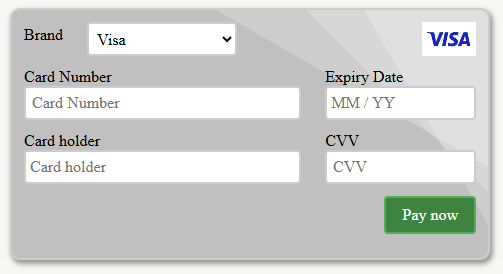
Default COPYandPAY form.
Plain style
<form action="https://developer.peachpayments.com/docs/oppwa-integrations-copyandpay-customisation" class="paymentWidgets" data-brands="VISA MASTER AMEX"></form>body {background-color:#16a085;}var wpwlOptions = {style:"plain"}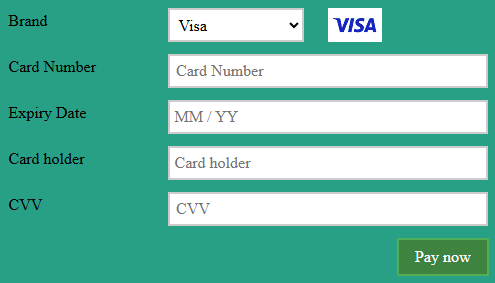
Plain style COPYandPAY form.
Card style
<form action="https://developer.peachpayments.com/docs/oppwa-integrations-copyandpay-customisation" class="paymentWidgets" data-brands="VISA MASTER AMEX"></form>body {background-color:#8e44ad;}var wpwlOptions = {style:"card"}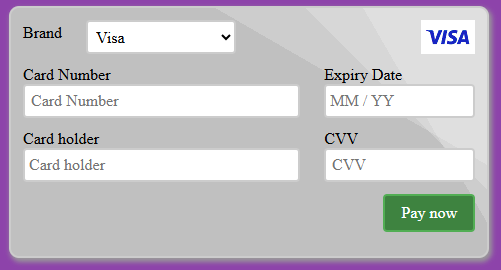
Card style COPYandPAY form.
Custom style
<form action="https://developer.peachpayments.com/docs/oppwa-integrations-copyandpay-customisation" class="paymentWidgets" data-brands="VISA MASTER AMEX"></form>.cnpBillingCheckoutWrapper {position:relative;}
.cnpBillingCheckoutHeader {width:100%;border-bottom: 1px solid #c0c0c0;margin-bottom:10px;}
.cnpBillingCheckoutLeft {width:240px;margin-left: 5px;margin-bottom: 10px;border: 1px solid #c0c0c0;display:inline-block;vertical-align: top;padding:10px;}
.cnpBillingCheckoutRight {width:50%;margin-left: 5px;border: 1px solid #c0c0c0;display:inline-block;vertical-align: top;padding:10px;}
.cnpBillingCheckoutOrange {font-size:110%;color: rgb(255, 60, 22);font-weight:bold;}
div.wpwl-wrapper, div.wpwl-label, div.wpwl-sup-wrapper { width: 100% }
div.wpwl-group-expiry, div.wpwl-group-brand { width: 30%; float:left }
div.wpwl-group-cvv { width: 68%; float:left; margin-left:2% }
div.wpwl-group-cardHolder, div.wpwl-sup-wrapper-street1, div.wpwl-group-expiry { clear:both }
div.wpwl-sup-wrapper-street1 { padding-top: 1px }
div.wpwl-wrapper-brand { width: auto }
div.wpwl-sup-wrapper-state, div.wpwl-sup-wrapper-city { width:32%;float:left;margin-right:2% }
div.wpwl-sup-wrapper-postcode { width:32%;float:left }
div.wpwl-sup-wrapper-country { width: 66% }
div.wpwl-wrapper-brand, div.wpwl-label-brand, div.wpwl-brand { display: none;}
div.wpwl-group-cardNumber { width:60%; float:left; font-size: 20px; }
div.wpwl-group-brand { width:35%; float:left; margin-top:28px }
div.wpwl-brand-card { width: 65px }
div.wpwl-brand-custom { margin: 0px 5px }var wpwlOptions = {
style: "plain",
billingAddress: {
country: "US",
state: "NY",
city: "New York",
street1: "111 6th Avenu",
street2: "",
postcode: "12312"
},
forceCardHolderEqualsBillingName: true,
showCVVHint: true,
brandDetection: true,
onReady: function(){
$(".wpwl-group-cardNumber").after($(".wpwl-group-brand").detach());
$(".wpwl-group-cvv").after( $(".wpwl-group-cardHolder").detach());
var visa = $(".wpwl-brand:first").clone().removeAttr("class").attr("class", "wpwl-brand-card wpwl-brand-custom wpwl-brand-VISA")
var master = $(visa).clone().removeClass("wpwl-brand-VISA").addClass("wpwl-brand-MASTER");
$(".wpwl-brand:first").after( $(master)).after( $(visa));
var imageUrl = "https://sandbox-card.peachpayments.com/v1/static/" + wpwl.cacheVersion + "/img/brand.png";
$(".wpwl-brand-custom").css("background-image", "url(" + imageUrl + ")");
},
onChangeBrand: function(e){
$(".wpwl-brand-custom").css("opacity", "0.3");
$(".wpwl-brand-" + e).css("opacity", "1");
}
}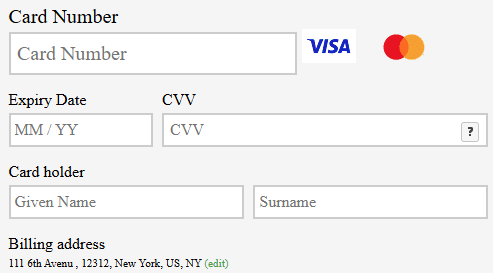
Custom style COPYandPAY form.
Style options
Change the style of the payment form by setting the style option in the wpwlOption object before loading the payment widget. Valid options are:
plaincard
<script>
    var wpwlOptions = {
        style: "card"
    }
</script>
<script async src="https://sandbox-card.peachpayments.com/v1/paymentWidgets.js?checkoutId={checkoutId}"></script>
Card number and CVV placeholder styles
To change the style of the placeholders inside card-number and cvv, use the option iframeStyle, as shown in the example below:
<script>
var wpwlOptions = {
    iframeStyles: {
        'card-number-placeholder': {
            'color': '#ff0000',
            'font-size': '16px',
            'font-family': 'monospace'
        },
        'cvv-placeholder': {
            'color': '#0000ff',
            'font-size': '16px',
            'font-family': 'Arial'
        }
    }
}
</script>
<script async src="https://sandbox-card.peachpayments.com/v1/paymentWidgets.js?checkoutId={checkoutId}"></script>Only supports web-safe fonts.
Language options
Change the language of the labels on the payment form by setting the locale option in the wpwlOption object before loading the payment widget.
<script>
    var wpwlOptions = {
        locale: "en"
    }
</script>
<script async src="https://sandbox-card.peachpayments.com/v1/paymentWidgets.js?checkoutId={checkoutId}"></script>
All supported locales
| Code | Language |
|---|---|
| ar | Arabic |
| be | French |
| bg | Bulgarian |
| ca | Catalan |
| cn | Simplified Chinese |
| cz | Czech |
| da | Danish |
| de | German |
| el | Greek |
| en | English |
| es | Spanish |
| et | Estonian |
| eu | Basque |
| fi | Finnish |
| fr | French |
| gr | Greek |
| hr | Croatian |
| hu | Hungarian |
| id | Indonesian |
| it | Italian |
| ja | Japanese |
| ko | Korean |
| lt | Lithuanian |
| lv | Latvian |
| nl | Dutch |
| no | Norwegian |
| pl | Polish |
| pt | Portuguese |
| ro | Romanian |
| ru | Russian |
| sk | Slovak |
| sl | Slovene |
| sv | Swedish |
| tr | Turkish |
| zh | Traditional Chinese |
Brand options
Select payment options manually by entering the options in the <form> tag.
<form action="" class="paymentWidgets" data-brands="VISA MASTER"></form>CSS reference
Override any of the form's CSS by adding custom CSS to your stylesheet. For advanced styling, use the default plain style. However, you can combine custom stylesheets with any of the default style options.
All class and container names are static and do not change to avoid invalidating existing integrations and customisations. Any planned changes get communicated upfront, allowing for code migration and full support.
Base CSS classes
For performance, all elements use a base CSS class and an individual CSS class. For example, the credit card payment form container uses the base .wpwl-container class and the individual .wpwl-container-card class to specify the card payment form container.
Container
The .wpwl-container class wraps the payment form. Use this class to apply margins between your page elements and the payment form.
<div class="wpwl-container">
    ...
</div>
Individual classes: .wpwl-container-card
Form
The .wpwl-form class styles all payment forms. Use this class to customise the look and feel of the payment form, including backgrounds or shadows.
<form class="wpwl-form wpwl-clearfix" action="https://sandbox-card.peachpayments.com/v1/checkouts/{checkoutId}/payment" method="POST" target="cnpIframe" lang="en">
    ...
</form>
Individual classes: .wpwl-form-card
Groups
The .wpwl-group class wraps the label and the wrapper of the input element. Use this to style labels and inputs together, for example, position or, width.
<div class="wpwl-group">
    <div class="wpwl-label">...</div>
    <div class="wpwl-wrapper">...</div>
</div>
Individual classes:
.wpwl-group-brand.wpwl-group-cardNumber.wpwl-group-expiry.wpwl-group-cardHolder.wpwl-group-cvv.wpwl-group-submit: styles the "Pay now" button..wpwl-group-button: styles the buttons containing the brand.
Labels
The .wpwl-label class holds the label of an input element.
<div class="wpwl-label">
    Card Number
</div>
Individual classes:
.wpwl-label-brand.wpwl-label-cardNumber.wpwl-label-expiry.wpwl-label-cardHolder.wpwl-label-cvv
Input and select wrappers
Input and select elements wrap in a div to provide more control over their styles, specifically their width.
The .wpwl-wrapper class holds an input or select element. Use this to set the width of the containing input or select element.
<div class="wpwl-wrapper">
    ...
</div>
Individual classes:
.wpwl-wrapper-brand.wpwl-wrapper-cardNumber.wpwl-wrapper-expiry.wpwl-wrapper-cardHolder.wpwl-wrapper-cvv.wpwl-wrapper-submit
Input and select elements
All textual <input>, <textarea>, and <select> elements have a base .wpwl-control class and set width: 100% by default. Set the width of these elements via .wpwl-wrapper.
The .wpwl-control class styles the borders, backgrounds, or paddings of all <input> and <select> elements.
<input class="wpwl-control wpwl-control-cardNumber" name="card.number" autocomplete="off" type="tel" placeholder="Card Number">
<select class="wpwl-control wpwl-control-brand" name="paymentBrand">
    <option value="MASTER">Mastercard</option>
    <option value="VISA">Visa</option>
</select>
Individual classes:
.wpwl-control-brand.wpwl-control-cardNumber.wpwl-control-expiry.wpwl-control-cardHolder.wpwl-control-cvv
Buttons
The .wpwl-button class styles the submit buttons.
<button type="submit" name="pay" class="wpwl-button wpwl-button-pay">Pay now</button>Individual classes:
.wpwl-button-pay: styles the "Pay now" button..wpwl-button-brand: styles the buttons containing a brand.
Brands
The .wpwl-brand class styles the brand icons.
<div class="wpwl-brand wpwl-brand-MASTER"></div>Individual classes:
.wpwl-brand-card: styles the card brands..wpwl-brand-BRAND: styles the specific brand.
Error hints
The .wpwl-has-error class adds a red background, border, and colour to the input element and, a red colour to the next .wpwl-hint element.
<input autocomplete="off" type="tel" name="card.number" class="wpwl-control wpwl-control-cardNumber wpwl-has-error" placeholder="Card Number">
<div class="wpwl-hint wpwl-hint-cardNumberError">
    Invalid card number or brand
</div>
</input>
Individual classes:
.wpwl-hint-cardNumberError.wpwl-hint-expiryError.wpwl-hint-cardHolderError.wpwl-hint-cvvError
Helpers
The .wpwl-clearfix class allows elements to contain floats without re-sorting. If you float .wpwl-label and .wpwl-wrapper, add .wpwl-clearfix to .wpwl-group.
<div class="wpwl-group wpwl-clearfix">
    <div class="wpwl-label">...</div>
    <div class="wpwl-wrapper">...</div>
</div>
Credit card HTML and CSS classes
An example HTML output of the credit card payment form:
<div id="card_220921339056" class="wpwl-container wpwl-container-card">
    <form class="wpwl-form wpwl-form-card wpwl-clearfix" action="https://sandbox-card.peachpayments.com/v1/checkouts/{checkoutId}/payment" method="POST" target="cnpIframe" lang="en">
        <div class="wpwl-group wpwl-group-brand wpwl-clearfix">
            <div class="wpwl-label wpwl-label-brand">Brand</div>
            <div class="wpwl-wrapper wpwl-wrapper-brand">
                <select class="wpwl-control wpwl-control-brand" name="paymentBrand">
                    <option value="MASTER">Mastercard</option>
                    <option value="VISA">Visa</option>
                </select>
            </div>
            <div class="wpwl-brand wpwl-brand-card wpwl-brand-MASTER"></div>
        </div>
        <div class="wpwl-group wpwl-group-cardNumber wpwl-clearfix">
            <div class="wpwl-label wpwl-label-cardNumber">Card Number</div>
            <div class="wpwl-wrapper wpwl-wrapper-cardNumber">
                <input autocomplete="off" type="tel" name="card.number" class="wpwl-control wpwl-control-cardNumber" placeholder="Card Number">
            </div>
        </div>
        <div class="wpwl-group wpwl-group-expiry wpwl-clearfix">
            <div class="wpwl-label wpwl-label-expiry">Expiry Date</div>
            <div class="wpwl-wrapper wpwl-wrapper-expiry">
                <input autocomplete="off" type="tel" name="card.expiry" class="wpwl-control wpwl-control-expiry" placeholder="MM / YY">
            </div>
        </div>
        <div class="wpwl-group wpwl-group-cardHolder wpwl-clearfix">
            <div class="wpwl-label wpwl-label-cardHolder">Card holder</div>
            <div class="wpwl-wrapper wpwl-wrapper-cardHolder">
                <input autocomplete="off" type="text" name="card.holder" class="wpwl-control wpwl-control-cardHolder" placeholder="Card holder">
            </div>
        </div>
        <div class="wpwl-group wpwl-group-cvv wpwl-clearfix">
            <div class="wpwl-label wpwl-label-cvv">CVV</div>
            <div class="wpwl-wrapper wpwl-wrapper-cvv">
                <input autocomplete="off" type="tel" name="card.cvv" class="wpwl-control wpwl-control-cvv" placeholder="CVV">
            </div>
        </div>
        <div class="wpwl-group wpwl-group-submit wpwl-clearfix">
            <div class="wpwl-wrapper wpwl-wrapper-submit">
                <button type="submit" name="pay" class="wpwl-button wpwl-button-pay">Pay now</button>
            </div>
        </div>
        <input type="hidden" name="shopperResultUrl" value="https://sandbox-card.peachpayments.com/v1/checkouts/{checkoutId}/payment">
        <input type="hidden" name="card.expiryMonth" value="">
        <input type="hidden" name="card.expiryYear" value="">
    </form>
</div>
Updated 4 months ago